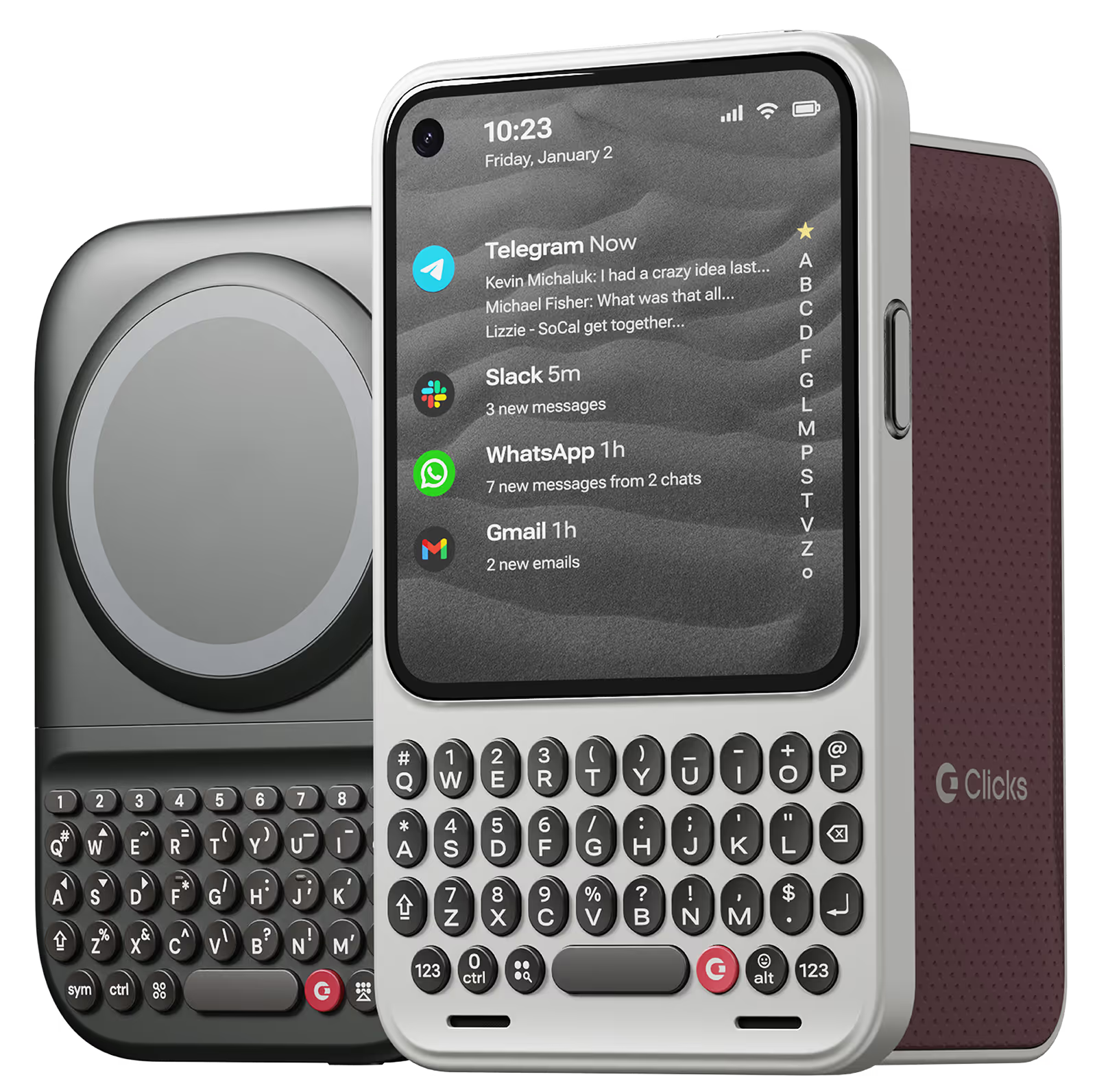
Why you'll love Clicks.

1
Feel satisfying real buttons
Pressing real buttons and hearing that little clicking sound feels more natural and rewarding.
Replay
2
Elevated premium protection
Brushed metal side keys, a microfibre lining, and a new enclosure that feels great while adding protection inside and out.
Replay
3
See more screen
Free your screen, with 50% more usable display to work, play, surf, chat and engage with your content.
Replay
4
Take action, faster
Launch customized shortcuts at the push of a button. Personalize your keyboard to control your home, launch apps, text or call contacts.
Replay
5
Keep your laptop at home
Make more happen right from your phone without needing to crack open your laptop.
Clicks for iPhone
Available for iPhone 17, 16, 15 and 14.
In stock & shipping now.
Buy Now
Clicks for Pixel
Pixel-perfect productivity.
Available now.
Buy Now
Clicks for Razr
Pocket-sized. Power-packed.
Available now.
Buy Now

Buttons with benefits.

More Screen

Get 50% more usable display to work, play, surf, chat and engage with your content.

Customizable Shortcuts

Launch custom actions at the push of a button.

Powerful Productivity

Real buttons that help you work smarter while away from your desk.

What Clicks users are saying.

Based on 5,328 user reviews.
Raj R.
Clicks for iPhone 14 Pro

Huge fan of MrMobile so ordered right away when I saw Clicks got announced. Never was a real keyboard guy but now I get why he's never given up on buttons.

Visit source
Marcos A.
Clicks for iPhone 15

My phone became too big and I couldn’t put in my pocket. The keyboard actually does a clicking sound but after a while it’s too loud, it could be more of a soft typing. The lights of the keyboard go off all the time and when it’s dark I have to press any button to turn it on then start typing which I wish it detected that I’m about to start typing so I can see the keyboard. Rather than that it was good. It takes give you more screen and more precise typing but than the space it gives to the screen its takes from the size of the phone. I prefer having a smaller size phone without the big keyboard.

Visit source
Erika F.
Clicks for iPhone 14 Pro

I love the feedback of real buttons. It's so satisfying! Instead of getting my laptop out for longer messages, now I can just use my iPhone with Clicks.

Visit source
Darwin Cruz
Clicks Keyboard for iPhone 15

This is the best rendition of what a physical keyboard should be in 2025. Clicks is a category first product and I am surprised about how they launched something like this. This keys are just rightly spaced, though I wish I could have the bigger keys, layout and slanted feel on the new iPhone 16 series. Nevertheless, this is an awesome product and a genius work of art.

Visit source
Aimee W.
Clicks for iPhone 16

i have been using clicks for over a week now and I love it, best choose I made. As soon as I saw the case out the box I was wowed by it and knew instantly I would love it. I’m getting used to using the physical keyboard now, I love the shortcuts you can make as well. I can’t see going back to using one of my other cases I love using clicks that much, defiantly recommend.

Visit source
Kristen S.
Clicks for iPhone 15

SO GOOD! I would say this deserves much higher than a 5/5, if possible... maybe even a 10/5. It's GREAT! I REALLY LOVE my Clicks Keyboard. Way to go team! I have a lot of photos I can submit if you are looking for a keyboard model...

Visit source
Jason S.
Clicks for iPhone 16 Pro

I had the original Clicks keyboard for the iPhone 15, and while the color was a little outlandish, the ease of typing and new screen real estate made it feel like a "phablet." Now that I have been able to upgrade to the 16 Pro Max, I wanted to try out the second iteration of the Clicks keyboard, and I am so impressed. It has an Alcantara/suede interior the rear glass sits in, and I can see the manufacturer added a MagSafe magnet which I use daily. The camera bump is a little shallow to be very protective, but I keep this on my desk and in my pocket when I'm walking at work. The keyboard experience is confident, reliable (so far), and easy to become intuitive. I was always a BlackBerry user and have been quick but clumsy on touch screen keyboards but managed to get by with aggressive auto-correct. I am not a huge fan of voice to text because I work in tight settings. Thus, this really fits the bill for me. EVERYONE I work with asks about it and is impressed. The shortcuts help out, especially with the new Apple Intelligence command. I've just been really impressed ever since I learned about this keyboard concept from the Crackberry forum (I believe it was co-created by its founder). I hope to have this for the life of my iPhone, which I anticipate very heavy daily use for about three years. Updates to come :)

Visit source
雅文 武市
Clicks Keyboard for Razr (2024)

razr60にて使用していますがrazrのサブディスプレイに最適です。

Visit source
Duarte Costa
Clicks Keyboard for iPhone 16

This product is really nice and easy to use. The keyboard has a comfortable touch and feedback. I highly recommend it.

Visit source
mauricio pedrero
Clicks Keyboard for iPhone 16

it works all the time its part the phone

Visit source

Clicks has you covered.
Try for 30 days.

It takes a week or two to get used to typing on real buttons –  you’ll need a little bit of patience and perseverance. Trust our tens of thousands of customers, it’s so worth it!

If it’s just not for you, we’ll give you your money back, no questions asked.