Clicks Keyboard for iPhone

Your iPhone is better with buttons.

Buy Now
Buy Now
Loved by thousands of fast-typing fingers worldwide.

Shop Clicks Keyboards.

Select your iPhone 17 model.
Select iPhone model & color.
iPhone 17 Pro
iPhone 17 Pro Max
iPhone 17
Select your color.
Onyx
Smoke
$139
US$159
Shipping date metafield text.
Add to cart
Out of stock
Leave your email to be notified when it's back in stock.
We’ll email you when your selected model is back in stock.
Oops, something went wrong. Try again.
Fall savings promo - our largest sale yet!
Available while quantities last.
Select your iPhone 16 model.
Select iPhone model & color.
iPhone 16 Pro
iPhone 16 Pro Max
iPhone 16
iPhone 16 Plus
iPhone 16e
Select your color.
Onyx
Spice
Surf
Royal Ink
Miami Beach
$139
US$159
Shipping date metafield text.
Add to cart
Out of stock
Leave your email to be notified when it's back in stock.
We’ll email you when your selected model is back in stock.
Oops, something went wrong. Try again.
Fall savings promo - our largest sale yet!
Available while quantities last.
Select your iPhone 15 model.
Select iPhone 15 model & color.
iPhone 15 Pro
iPhone 15 Pro Max
iPhone 15
iPhone 15 Plus
Select the color of your Clicks.
London Sky
BumbleBee
Royal Ink
Miami Beach
$139
US$159
Shipping date metafield text.
Add to cart
Out of stock
Leave your email to be notified when it's back in stock.
We’ll email you when your selected model is back in stock.
Oops, something went wrong. Try again.
Looking for regional keyboard layouts? Check out QWERTZAZERTY.
Select your iPhone 14 model.
Select iPhone 14 model & color.
iPhone 14 Pro
iPhone 14 Pro Max
Select the color of your Clicks.
London Sky
BumbleBee
$139
US$159
Almost gone - order now!
Add to cart
Out of stock
Leave your email to be notified when it's back in stock.
We’ll email you when your selected model is back in stock.
Oops, something went wrong. Try again.

Take a closer look.

Elevated input.

The best mobile keyboard yet, ergonomically designed to help you type faster, longer and more accurately.

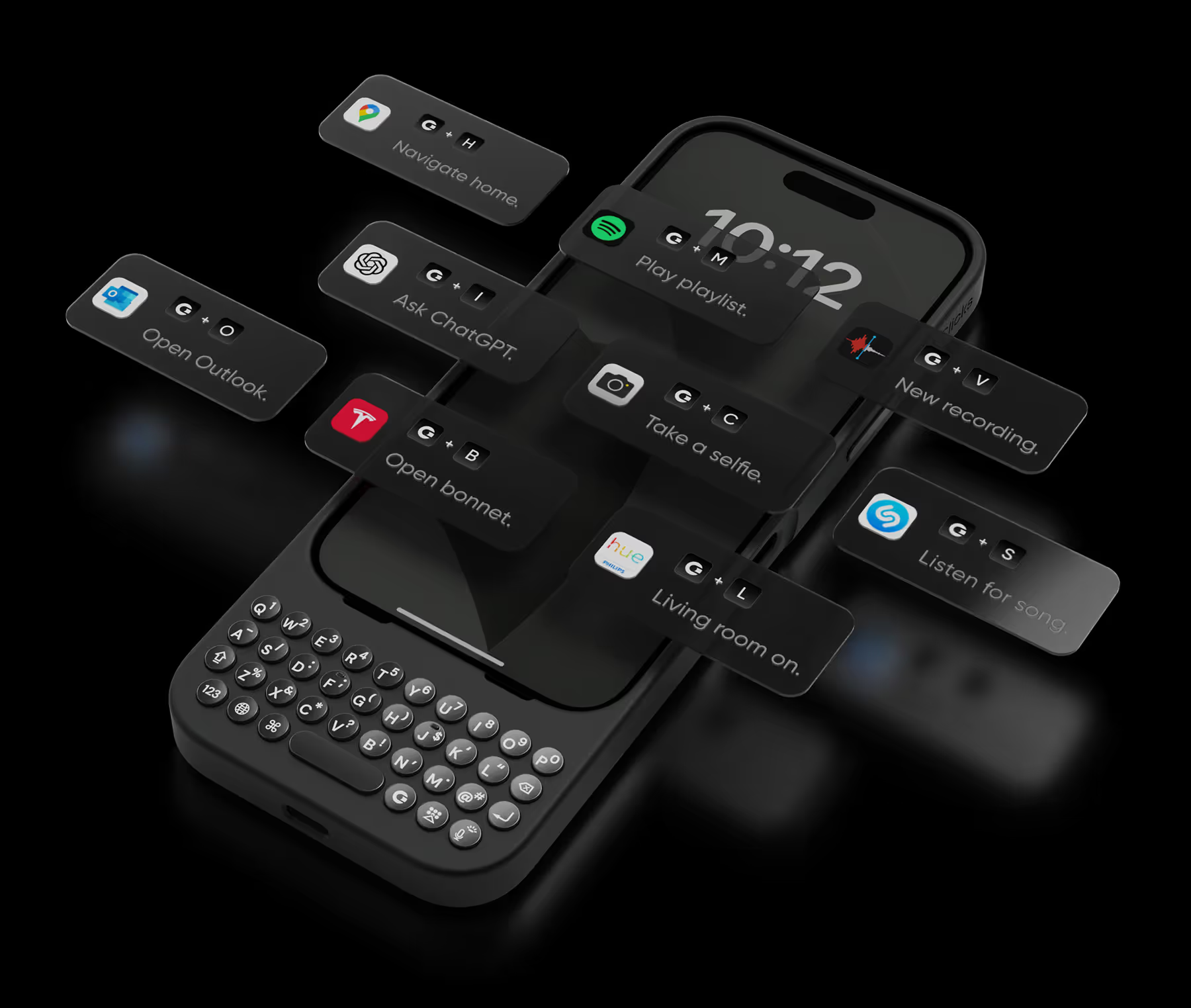
Take action.

Launch Apple Shortcuts at the push of a button. Personalize your keyboard to control your home, take actions, launch apps, and more.
+
T
Open bonnet.
+
L
Living room on.
+
A
Ask ChatGPT.
+
T
Open bonnet.
+
L
Living room on.
+
A
Ask ChatGPT.
+
T
Open bonnet.
+
L
Living room on.
+
A
Ask ChatGPT.
+
S
Listen for song.
+
C
Take a selfie.
+
M
Play emails.
+
S
Listen for song.
+
C
Take a selfie.
+
M
Play emails.
+
S
Listen for song.
+
C
Take a selfie.
+
M
Play emails.
+
V
Record voice.
+
P
Play playlist.
+
N
Navigate home.
+
V
Record voice.
+
P
Play playlist.
+
N
Navigate home.
+
V
Record voice.
+
P
Play playlist.
+
N
Navigate home.

See more. Say more.

Free your screen, with 50% more usable display to work, play, surf, chat and engage with your content.

Stay connected.

With built in support for MagSafe, USB-C data transfer, and pass through charging, Clicks works with your existing ecosystem.

No light?
No problem.

Backlit keys and customizable keyboard brightness make it easy to burn the midnight oil without losing sight of what you’re saying.

Unlock extra features
with the Clicks app.

The Clicks App for iPhone makes it easy to manage your keyboard settings, unlock new features and keep your Clicks keyboard updated with the latest features.
Adjust backlight settings.
Unlock additional setting controls.
Free software updates.

Clicks has you covered.

Free standard shipping
When you buy at Clicks.tech, your Clicks Keyboard will ship next day.
Easy returns
Try Clicks for 30 days. Return it no questions asked.
1-year warranty
We’ll replace your Clicks Keyboard free for one year if there’s a defect.

Compare Clicks Keyboard models.

Clicks Keyboard for iPhone 16

Clicks Keyboard for iPhone 15

Clicks Keyboard for iPhone 14

Premium Keyboard Experience
Backlit Keyboard
Clicks Mode
MagSafe Compatible
New Ergonomic Sculpted Keys
USB-C Data Mode
Models Supported
16 Pro Max
16 Pro
16 Plus (coming soon)
16 (coming soon)
15 Pro Max
15 Pro
15 Plus
15
14 Pro Max
14 Pro
Connectivity
USB-C (Charging + Data)
USB-C (Charging)
Lightning (Charging + Data)
Colors

What Clicks users are saying.

Based on 5,328 user reviews.
David
Clicks for iPhone 15 Pro

ever since I switched from a blackberry to an iPhone, I’ve been frustrated trying to type with a keyboard and with that darn AutoCorrect constantly making it difficult for me to get a sentence across. For the past decade, I’ve been joking that I wish I can get my blackberry back because I miss the feeling of the textile keypad and being able to actually feel and see and touch the buttons that I want to hit. Then, I found clicks! It’s like they were listening to my thoughts and created a product. That’s exactly what I was hoping for. The Bunce feel perfect, everything works perfectly with my phone, no glitching, no problems whatsoever. If you were sick of fighting with your iPhone and just want something that you can use that is clean, crisp, and you can finally get the satisfaction of typing and hitting the buttons that you want to hit. Then get yourself a Clicks.

Visit source
Dennis Smith
Clicks Keyboard for iPhone 16

Loving the keyboard experience on the iPhone, and loving the costumer service too.

Visit source
John A.
Clicks for iPhone 14 Pro

Overall I have really enjoyed using my Clicks Keyboard, it works really well with the iPhone 14 Pro Max. It does make the phone quite a lot longer, but that is a small price to pay for all of the additional usability it provides from the great keyboard to significantly more screen real estate.

Visit source
Eric P
Clicks Keyboard for iPhone 15

The Clicks keyboard really works! I am extremely happy with it. After using it for only a few weeks, I can’t imagine being without it. It is well designed and well made.

Visit source
Mr Leon Haji Hussein
Clicks Keyboard for Pixel 9/9 Pro

Am about 3 weeks in and been having fun with this thing. Didnt take long to master but it feels like a steep learning curve for the first two days. Stick with it, makes so much sense and changed my phone usage for the better.

Visit source
Jonathan B.
Clicks for iPhone 14 Pro

I avoided getting a Blackberry for as long as I could and then got given one in my job. I fell in love with it and became so fast on the keyboard. When the first iPhone came out, I swopped to it, but despite it being amazing, I did go back to Blackberry after six months or so, down to the keyboard. Then, Blackberry disappeared, and I had no choice but to get used to the iPhone. Anyway, I am now firmly in the iPhone camp and can't see myself ever-changing, but adding this keyboard case has made the iPhone even better. I love using it, and I'm getting faster at typing again; the other big plus is that I'm so much more accurate than a virtual keyboard. Things I hope for in a future version is a notification light and support for Carplay through the case.

Visit source
Sarah Z.
Clicks for iPhone 15 Pro

My thumbs were constantly cramping from on-screen typing. Emails were a nightmare, and forget about editing documents! The Clicks Keyboard has been a lifesaver. The keys are perfectly sized for comfortable typing, and the layout is intuitive. My productivity has skyrocketed, and I can finally enjoy using my iPhone for more than just social media.

Visit source
Theodore S.
Clicks for iPhone 15

This review was created on my iPhone with clicks and the tools available to proof my text. --- There’s always been a gap between what I can easily do on my phone and what requires my laptop. **Clicks** has significantly narrowed that gap. Tasks I used to avoid on my phone—like juggling multiple apps, working with spreadsheets, or doing in-depth research with detailed document annotations—are now much easier. Clicks has reduced my frustrations by removing the on-screen keyboard that often blocked important parts of my work. It expanded my screen space, making my phone much more efficient. I now feel more confident using spreadsheets without worrying about accidentally messing up a cell. With the ability to create custom shortcuts and increased proficiency with the keyboard, I wouldn’t want to go back to life without Clicks. It has truly transformed my phone into a more powerful mobile office.

Visit source
Dallas
Clicks for iPhone 15

I had high hopes for the Clicks keyboard. I specifically purchased an Iphone 14 pro to allow for a reasonable sized combination with the Clicks keyboard as well as compatibility with wired Carplay. I had been using a Blackberry Key 2 and then Unihertz Titan Slim and the Iphone 14 pro with Clicks is vastly superior to either of those. After 10 days or so I have gotten used to the key locations and typing is quick and accurate. Initially there was a couple of glitches with the Clicks losing connection with the Iphone, but that has not occurred at all since. A dream come true for a keyboard aficionado! As the title indicates Clicks with an Iphone is "Better than Expected"!

Visit source
Matthew M.
Clicks for iPhone 15

Great implementation of concept. Addition of cursor mode is a huge leap in usability —- looking forward to continued updates. For those wishing to use for programming or IT, note that it cannot type +, *, or _ keys from hardware keyboard

Visit source